Can You Connect a Soundbar to a Projector? Check HDMI ARC, Optical, and Bluetooth Before Buying
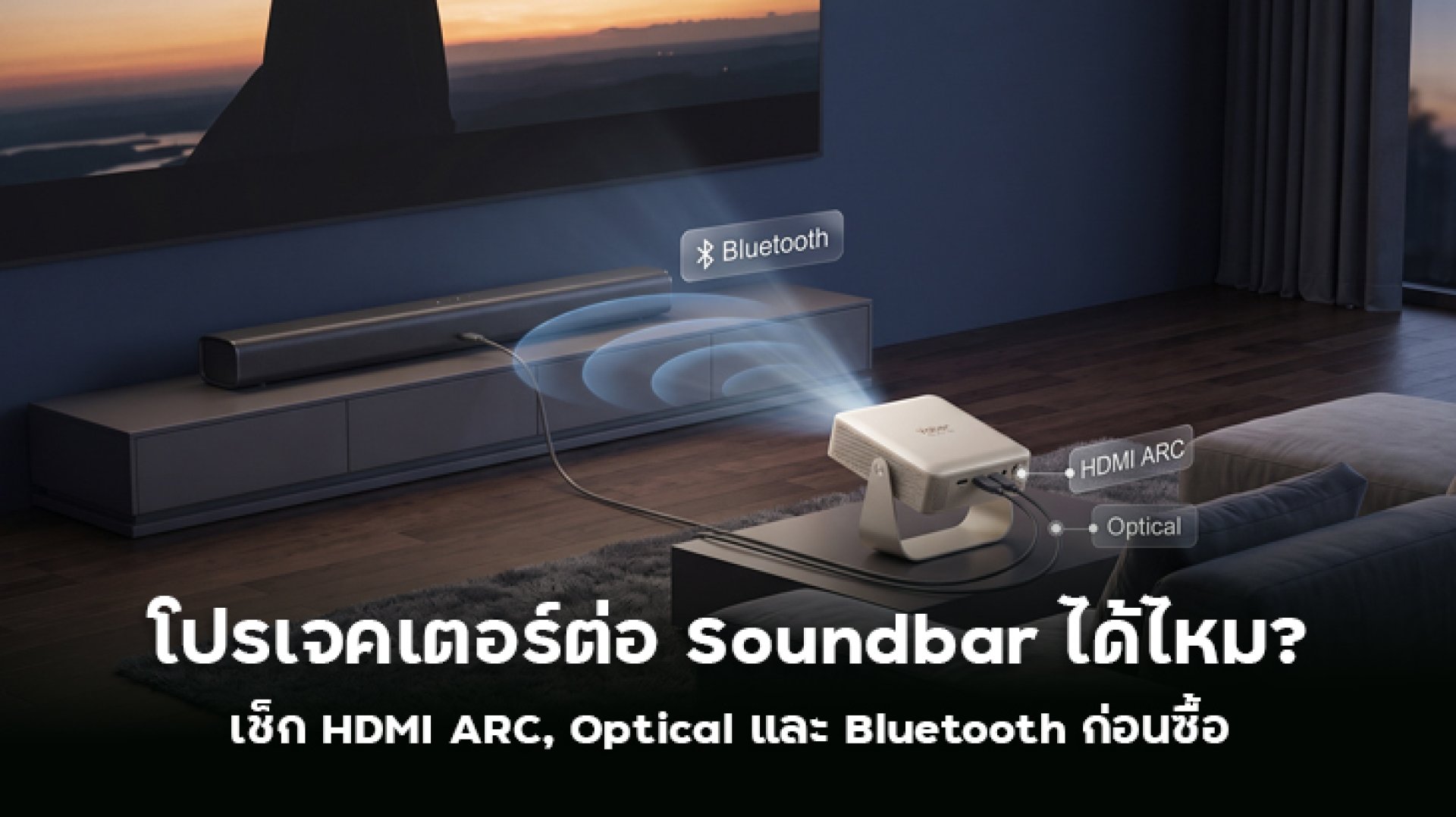
Have you bought a projector for a big-screen movie experience but feel that the built-in speakers are not powerful enough? Adding a Soundbar can make dialogue clearer, deliver deeper bass, and create a more immersive home theater experience. But can you actually connect a Soundbar to a projector? Should you use HDMI ARC, Optical, or Bluetooth? Which connection is the best choice?
The answer is yes. Projectors can connect to Soundbars in several ways, but you need to check which audio ports both devices support. Some projectors have HDMI ARC, others offer Optical or AUX, while certain models rely on Bluetooth. Choosing the right connection can help prevent common problems such as no sound, audio delay, or unsupported audio formats.
This guide explains each connection method, its advantages and limitations, and what to check before buying a projector or Soundbar.
Can You Connect a Soundbar to a Projector? What Should You Check First?
You can connect a Soundbar to a projector as long as both devices have compatible audio connections. Common options include HDMI ARC, Optical, Bluetooth, and AUX. However, not every projector supports all four connection types.
Before buying a Soundbar or projector, check these three important things:
- Projector audio ports: Does it have HDMI ARC, Optical Audio, AUX, or Bluetooth?
- Soundbar input ports: Does it support the same connection method as your projector?
- Supported audio formats: Check whether the devices support Stereo, Dolby Digital, or Dolby Atmos if you want a surround-sound experience.
One important detail: having a standard HDMI port does not automatically mean that it supports HDMI ARC. Look for the ARC or eARC label near the port, or check the product manual before connecting your devices.
HDMI ARC vs Optical vs Bluetooth: What Is the Difference?
Each connection method has its own advantages and limitations. Some are better for home theater setups, others are easier to install without cables, and some are suitable for basic audio systems.
| Connection | Advantages | Limitations | Best For |
|---|---|---|---|
| HDMI ARC | Audio transmission through one HDMI cable; supports various audio formats depending on the devices | Both devices must support HDMI ARC or eARC | Home theater users who want a convenient wired setup |
| Optical | Digital audio transmission without Bluetooth pairing | Does not support some advanced formats, such as Dolby Atmos over TrueHD | Users who want a stable wired audio connection |
| Bluetooth | Wireless connection with no audio cable required | May introduce audio latency; quality depends on the supported codec | Users who prefer convenience and flexible placement |
| AUX 3.5mm | Simple connection compatible with many devices | Analog audio with quality depending on the device's audio circuitry | Basic Soundbars and older equipment |
1. Connecting a Projector to a Soundbar Through HDMI ARC
HDMI ARC, or Audio Return Channel, allows audio signals to travel back through an HDMI cable. This means you do not need a separate audio cable when connecting compatible devices. It is commonly used in home entertainment systems that include projectors, media players, televisions, and Soundbars.
Advantages of HDMI ARC
- Transmits audio through a single HDMI cable.
- Supports various audio formats depending on the connected devices.
- Can support HDMI-CEC, allowing compatible devices to share remote-control functions.
- Helps reduce cable clutter in a home theater setup.
How to Connect a Projector to a Soundbar Using HDMI ARC
- Check whether your projector has an HDMI port labeled ARC or eARC.
- Make sure your Soundbar also supports ARC or eARC.
- Connect the projector's HDMI ARC port to the Soundbar's HDMI OUT (ARC) port.
- Open the projector's audio settings and select HDMI ARC as the audio output.
- If available, enable HDMI-CEC according to your preferences.
- Play a video or movie to check whether the sound comes through the Soundbar.
Important: HDMI ARC and eARC are not the same. eARC offers higher bandwidth and supports advanced audio formats such as Dolby TrueHD and uncompressed Dolby Atmos, provided that all devices in the signal chain support them.
If your projector has a standard HDMI port but does not support ARC, you cannot use an ordinary HDMI cable to send audio back to the Soundbar through ARC.
2. Connecting a Soundbar Through Optical Audio
Optical Audio, also known as TOSLINK, transmits digital audio through a fiber-optic cable. It is a useful alternative when both your projector and Soundbar have Optical ports but do not support HDMI ARC.
Advantages of Optical Audio
- Transmits digital audio signals.
- Does not require Bluetooth pairing.
- Avoids Bluetooth-related audio latency.
- Works well for everyday movie watching and music playback.
How to Connect a Projector to a Soundbar Through Optical
- Check that both the projector and Soundbar have Optical Audio ports.
- Connect the projector's Optical Out port to the Soundbar's Optical In port using an optical cable.
- Set the projector's Audio Output to Optical or SPDIF.
- If your Soundbar does not support the selected audio format, try changing the output format to PCM.
- Select Optical as the Soundbar's input source.
- Play a video to test the audio connection.
The main limitation of Optical is that it does not support certain advanced audio formats, including Dolby TrueHD, DTS-HD Master Audio, and Dolby Atmos over TrueHD. However, it can support Stereo and Dolby Digital, depending on the connected devices.
For everyday movies, streaming content, and music, Optical is a practical option. If you want more advanced home theater audio formats, check whether your equipment supports HDMI ARC or eARC.
3. Connecting a Projector to a Soundbar Through Bluetooth
Bluetooth is usually the easiest connection method because no physical audio cable is needed. Simply enable Bluetooth on both devices, put the Soundbar into pairing mode, and connect it to the projector.
Advantages of Bluetooth
- No audio cable is required between the projector and Soundbar.
- Offers flexible placement options.
- Suitable for rooms where you want to avoid visible cables.
- Easy to pair and disconnect when needed.
Bluetooth Limitations You Should Know
Although Bluetooth is convenient, it can introduce audio latency. This means the sound may arrive later than the image on the screen. For example, you might see a character's mouth move before hearing the dialogue.
Latency depends on several factors, including the Bluetooth codec, device processing, and audio settings. It can be especially noticeable when watching movies or playing games that require accurate audio synchronization.
Before buying, check whether the projector supports Bluetooth Audio Output. Some models include Bluetooth only for connecting remote controls, keyboards, or mice. This does not necessarily mean they can transmit audio to a Soundbar.
4. Is AUX 3.5mm Still Useful?
AUX 3.5mm is an analog audio connection found on some projectors and Soundbars. It is useful when you want a simple wired connection or have a basic Soundbar without HDMI ARC or Optical inputs.
To connect the devices, use a 3.5mm audio cable between the projector's Audio Out or Headphone Out port and the Soundbar's AUX In port. Then select AUX as the Soundbar's input source.
The limitation is that AUX does not transmit digital audio like HDMI or Optical. It also does not support multichannel audio formats in the same way as digital connections. Actual sound quality depends on the audio circuitry of the devices and the cable used.
Can You Connect a Soundbar to a Projector Without HDMI ARC?
Yes. HDMI ARC is not always necessary because there are other ways to connect a Soundbar. The best option depends on the ports available on your projector and audio system.
| Projector Port | Recommended Connection |
|---|---|
| Optical Out | Connect an Optical cable to the Soundbar. |
| Bluetooth Audio Output | Pair the projector with the Soundbar through Bluetooth. |
| AUX Out 3.5mm | Use a 3.5mm AUX cable. |
| HDMI ARC | Connect to the Soundbar's HDMI ARC port. |
| HDMI In only | You may need an HDMI Audio Extractor. |
If your projector only has HDMI inputs and no audio output, an HDMI Audio Extractor may help. This device separates audio from an HDMI signal and sends it to the Soundbar through Optical or AUX. Make sure the extractor supports your required video resolution, HDR features, and audio formats.
Another option is to connect your source device, such as an Android TV Box or media player, to the Soundbar first, then send the video signal to the projector through HDMI. However, you must check whether the Soundbar supports HDMI video passthrough.
Soundbar Connected but No Sound? How to Fix It
If you connect your projector to a Soundbar but hear nothing, do not assume that the hardware is faulty. The problem may be caused by an incorrect input selection or incompatible audio settings. Try these troubleshooting steps.
1. Incorrect Audio Output Selection
Open your projector's audio settings and check whether the selected output matches your actual connection: HDMI ARC, Optical, or Bluetooth.
2. Incorrect Soundbar Input Source
Some Soundbars have multiple input options, including HDMI, Optical, AUX, and Bluetooth. If the selected input does not match your cable or connection method, no sound will come through.
3. Unsupported Audio Format
If the projector sends Dolby Digital or another audio format that your Soundbar does not support, you may experience no sound or audio problems. Try changing the audio output format to PCM.
4. HDMI ARC or CEC Is Disabled
If you use HDMI ARC, check whether ARC and HDMI-CEC are enabled in the settings of your devices. Menu names may vary depending on the manufacturer.
5. Bluetooth Pairing Failed
Make sure the Soundbar is in pairing mode and is not already connected to another device. If necessary, remove the previous pairing and reconnect the devices.
Which Soundbar Connection Is Best for Movies and Gaming?
The best connection method also depends on how you use your projector. Watching movies and playing games have slightly different audio requirements.
For Movies and TV Shows
HDMI ARC or eARC is a good choice if both devices support it. It offers flexible audio transmission and supports different audio formats depending on the equipment. If ARC is unavailable, Optical is a practical alternative for everyday movies and streaming content.
For Gaming
Audio synchronization is important when gaming. If you want to reduce the risk of audio latency, consider a wired connection such as HDMI or Optical instead of Bluetooth. Actual latency still depends on the connected devices and their audio processing.
For Rooms Where You Want to Avoid Cables
Bluetooth offers convenient placement and a cleaner setup. However, test for audio delay before using it regularly, especially if you plan to watch movies or play games.
Projector and Soundbar Buying Checklist
If you plan to buy a projector and Soundbar together, use this checklist before making a purchase. It can help you avoid compatibility problems later.
- Check whether the projector has HDMI ARC or eARC.
- If ARC is unavailable, look for Optical Out.
- If you prefer wireless audio, confirm Bluetooth Audio Output support.
- Make sure the Soundbar has a compatible audio input.
- Check whether both devices support your preferred audio formats.
- Look for HDMI-CEC support if you want to control volume with one remote.
- If you play games, consider audio latency and synchronization.
Final Verdict: Which Connection Is Best for a Projector and Soundbar?
You can connect a Soundbar to a projector in several ways, and there is no single best option for everyone. The right connection depends on the ports available and how you plan to use your home theater system.
- HDMI ARC/eARC: Best for users who want a convenient wired connection and support for a wider range of audio formats.
- Optical: Ideal for stable digital audio without requiring advanced audio formats.
- Bluetooth: Best for convenience and cable-free installation, but be aware of possible audio delay.
- AUX: Suitable for basic audio equipment without digital audio connections.
If you are buying a new projector, check its audio output ports before making a purchase. HDMI ARC or Optical support can make it much easier to add a Soundbar later, without spending extra money on unnecessary adapters.
Frequently Asked Questions About Connecting a Soundbar to a Projector
1. Can every projector connect to a Soundbar?
Not every projector supports direct Soundbar connections. However, many models can send audio through at least one method, such as HDMI ARC, Optical, Bluetooth, or AUX. Always check the ports on both devices before buying.
2. What is the difference between HDMI and HDMI ARC?
Standard HDMI sends video and audio signals to a display or another device. HDMI ARC adds the ability to send audio back through the HDMI cable to a compatible Soundbar or audio system.
3. Will Bluetooth cause audio delay when connecting a Soundbar to a projector?
It can. Audio latency depends on the Bluetooth codec and how the devices process sound. If you want better audio synchronization for movies or gaming, consider a wired connection instead.
4. Which has better sound quality: Optical or HDMI ARC?
HDMI ARC supports a wider range of audio formats than Optical in many setups. eARC offers even greater bandwidth. However, actual sound quality depends on the source content, connected devices, and supported audio formats.
5. Can I connect a Soundbar if my projector only has HDMI In?
You may need an HDMI Audio Extractor to separate the audio signal and send it to the Soundbar through Optical or AUX. Alternatively, connect your source device to the Soundbar first and send video to the projector. Check device compatibility before choosing either method.
6. Should I turn off the projector's built-in speakers when using a Soundbar?
Not always, but playing audio through both the projector speakers and Soundbar simultaneously may cause overlapping sound or synchronization issues. If available, select External Speaker as the audio output or disable the built-in speakers in the projector settings.
References
- HDMI Licensing Administrator: Enhanced Audio Return Channel (eARC) Information about HDMI eARC standards and audio capabilities.
- Bluetooth SIG: Learn About Bluetooth An overview of Bluetooth technology and its applications.
- Dolby Support Information about Dolby audio formats and compatibility.