Kieslect BioKoop Has No Screen: How Do You View Your Health Data?
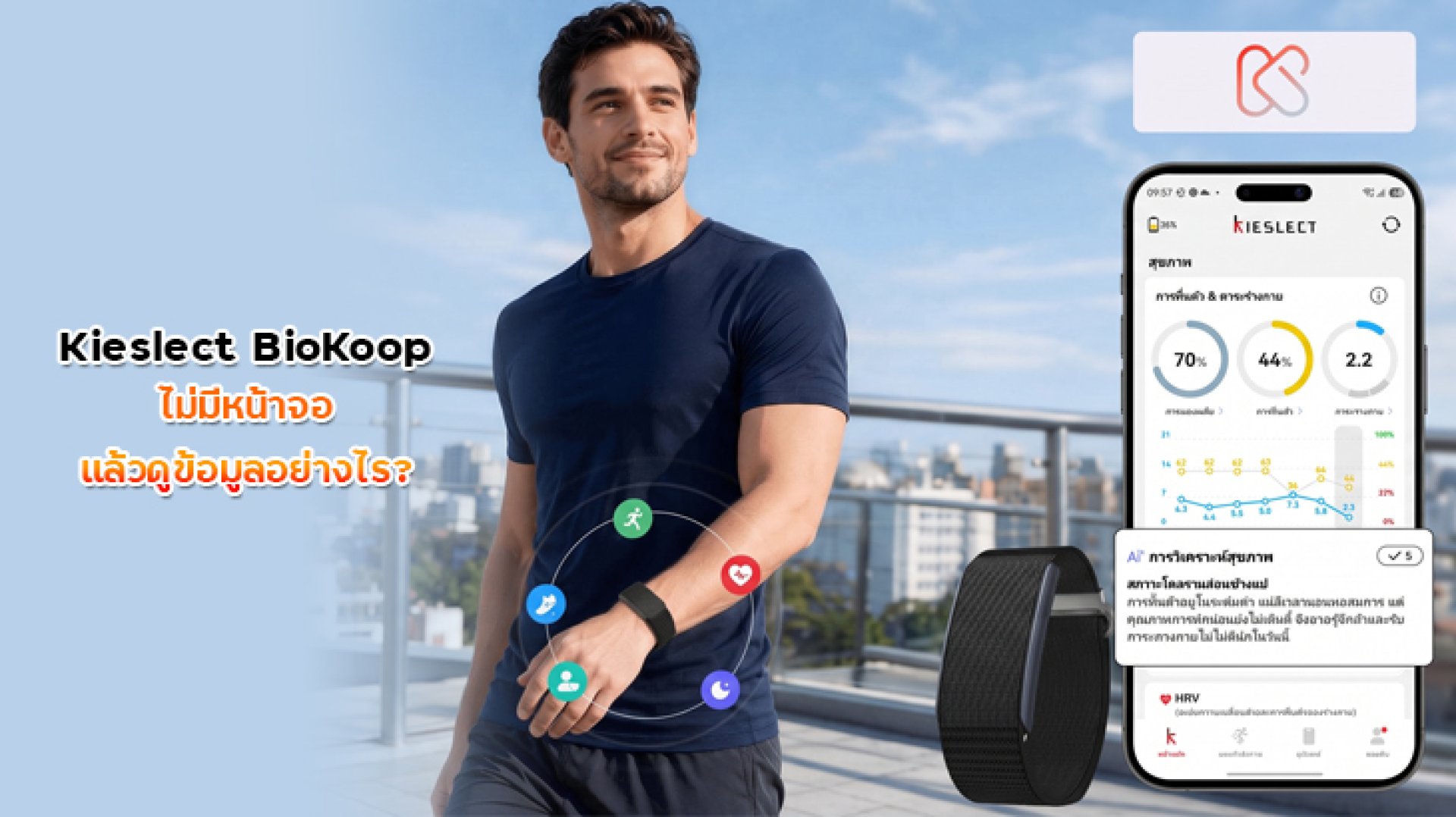
When you first see the Kieslect BioKoop, there is one question that naturally comes to mind: If it has no screen, how do I see my health data?
Most smartwatches and smart bands have a display where you can immediately check your heart rate, steps, workout data, or notifications. BioKoop takes a different approach.
Instead of putting a screen on your wrist, BioKoop focuses on collecting health and activity data while you wear it. The detailed information is then viewed through your smartphone using the Kstyle OS App.
In simple terms, BioKoop does not lack health data. It simply does not have a screen for displaying that data.
If Kieslect BioKoop Has No Screen, Where Is the Data Stored?
Kieslect BioKoop is designed as a screen-free health tracker. According to Kieslect, the device can continuously track health metrics such as Heart Rate, HRV, SpO, stress, and sleep, while also supporting 178 sports modes and outdoor workout route recording.
The device also has 32MB of local data storage, allowing health and activity information to be stored on the tracker before it is synchronized with the smartphone app.
Once connected to the app, the information can be viewed through your phone instead of on the device itself.
How the system works
- BioKoop = Wears on your body and collects health/activity data
- Bluetooth connection = Synchronizes data with your smartphone
- Kstyle OS App = Displays and analyzes your health information
- Smartphone = The main screen for viewing detailed reports
This is the main concept behind a screen-free wearable: the tracker collects the data, while your smartphone becomes the display.
Do You Need to Keep the Kstyle OS App Open All the Time?
No. You do not need to keep your smartphone screen on or leave the app open throughout the entire day.
BioKoop is designed to collect data while you wear it. You can then synchronize the information with the smartphone app when you want to review your health and activity data.
Kieslect describes its wearable apps as platforms for recording health data, activities, sports, sleep, and other information collected from compatible wearable devices.
This is one of the biggest differences between BioKoop and a traditional smartwatch. A smartwatch lets you check certain information immediately on your wrist, while BioKoop puts the detailed viewing experience on your smartphone.
What Can You View in the Kstyle OS App?
The app is an important part of the BioKoop experience because the device itself does not have a display.
According to Kieslect, BioKoop supports health tracking features including Heart Rate, HRV, SpO, stress, and full sleep-cycle analysis. It also supports 178 sports modes and outdoor workout route recording.
| Data | What You Can Track |
|---|---|
| Heart Rate | Heart rate data collected during daily activities and workouts |
| RHR | Resting heart rate information |
| HRV | Heart rate variability data |
| SpO | Blood oxygen saturation tracking |
| Stress | Stress-related tracking data |
| Sleep | Sleep duration and sleep-cycle information |
| Sports | Workout and activity data |
| Recovery | Recovery-related health information |
| Workout Route | Outdoor workout route information supported by the system |
Instead of trying to display all of this information on a tiny wrist screen, BioKoop uses the smartphone app to provide a larger viewing area for health reports and historical data.
How Do You Check Your Data During a Workout?
This is an important point to understand before buying BioKoop.
If you are the type of runner who likes to raise your wrist and immediately check your heart rate, pace, or workout time, a smartwatch with a display may be more suitable.
BioKoop is designed differently. Its main purpose is to collect data while you wear it rather than act as a real-time information screen on your wrist.
That makes it particularly interesting for people who prefer a more discreet wearable that does not constantly display notifications or information.
How Do You Check Sleep Data Without a Screen?
Sleep tracking is a good example of why a screen is not necessarily required for a health tracker.
While you sleep, BioKoop can collect supported sleep-related information. You can then synchronize the device with the app and review the recorded data on your smartphone.
Instead of checking only a simple number such as total sleep time, the smartphone provides a much larger screen for viewing sleep-related information and historical trends.
Kieslect lists full sleep-cycle analysis among BioKoop's health-tracking features.
What Are the Advantages of a Screen-Free BioKoop?
1. No Screen to Distract You
Without a display, BioKoop does not constantly put notifications, watch faces, or other information in front of you.
For people who want a wearable that quietly tracks their health in the background, this can actually be an advantage.
2. Designed for Lightweight, All-Day Wear
Kieslect lists BioKoop as an ultra-light 12.9g screen-free aluminum wearable designed for discreet all-day and sleep wear.
The lightweight design makes sense for a device intended to stay on your body for long periods rather than being used only during workouts.
3. Detailed Information Appears on a Larger Screen
A small wrist display is useful for quick information, but it is not ideal for viewing detailed health trends or historical data.
BioKoop takes the opposite approach: collect the information on the wearable, then use your smartphone's larger display for detailed reports.
4. Better Suited to Continuous Health Tracking
If your main goal is to monitor health and activity trends throughout the day rather than constantly interact with a watch screen, the screen-free concept can make sense.
Kieslect BioKoop vs. a Display-Based Smartwatch
| Feature | Kieslect BioKoop | Display Smartwatch |
|---|---|---|
| View data directly on your wrist | No | Yes |
| Health tracking | Yes | Yes |
| Detailed health reports | Through the app | Watch + app |
| Sleep tracking | Yes | Depends on the model |
| On-wrist notifications | No display | Usually available |
| Screen-free experience | Yes | No |
| Main focus | Health and activity tracking | Health + smartwatch functions |
So instead of asking whether a screen-free wearable is good or bad, the better question is:
Do I want to check information directly on my wrist, or do I prefer a wearable that quietly collects health data and lets me review everything later on my phone?
Who Is Kieslect BioKoop Best For?
- People who want continuous health and activity tracking
- People who want to wear a tracker while sleeping
- People who do not want a screen or constant notifications on their wrist
- People who prefer reviewing detailed health information on a smartphone
- People looking for a lightweight wearable for all-day use
- People who want health tracking without the typical smartwatch experience
Who May Not Be a Good Fit for BioKoop?
- People who want to check heart rate instantly on their wrist
- Runners who want to see pace and workout information without using a phone
- People who enjoy changing watch faces
- People who want to read smartphone notifications directly from their wrist
- People looking for a smartwatch that acts as a secondary smartphone display
So, How Do You View Data on a Screen-Free Kieslect BioKoop?
The short answer is: you view it through your smartphone using the Kstyle OS App.
BioKoop collects supported information such as Heart Rate, HRV, SpO, stress, sleep, and workout data while you wear it. The device can store data locally, while the smartphone app provides the interface for viewing and analyzing the information. Kieslect specifically states that BioKoop includes 32MB of local storage and an exclusive Kstyle OS App for visualized health reports.
So, the lack of a screen does not mean the device lacks health information. Instead, it changes the user experience from:
Check the data directly on your wrist.
to:
Wear the tracker, collect the data, then review the details on your smartphone.
If you want a smartwatch for checking real-time information directly on your wrist, a display-based smartwatch may be the better choice. But if your priority is continuous health tracking with a lightweight, screen-free design, Kieslect BioKoop offers a very different and interesting approach to wearable technology.
Frequently Asked Questions
Does Kieslect BioKoop really have no screen?
Yes. Kieslect BioKoop is designed as a screen-free wearable, so there is no display on the device for viewing health information directly.
Where can I view Kieslect BioKoop health data?
You can view your recorded health and activity information through the compatible Kieslect app. Kieslect describes its wearable apps as platforms for recording health, activity, sports, sleep, and other wearable data.
Do I need to keep the app open all day?
No. BioKoop is designed to collect data while you wear it. You can synchronize the information with your smartphone and review it through the app.
Can Kieslect BioKoop track sleep?
Yes. Kieslect lists full sleep-cycle analysis as one of BioKoop's health-tracking features.
Can I check my heart rate on BioKoop while running?
No, not directly on the device, because BioKoop has no display. If you need to view heart rate, pace, or other workout metrics directly on your wrist, a smartwatch with a screen would be more suitable.
Can BioKoop health data be used to diagnose a medical condition?
No. Wearable health data should be treated as general health and fitness information rather than a medical diagnosis. If you have health concerns, consult an appropriate healthcare professional.
References
- Kieslect Official Kieslect Health Tracker BioKoop
- Kieslect Official App Download and Wearable App Information
- Kieslect Official BioKoop Product Information